Executive Summary
The Koha Mobile Library System is a comprehensive solution designed to extend the existing Koha Integrated Library System (ILS) with a modern, student-centric mobile application. This project aims to provide university students with a seamless mobile experience for accessing library resources, managing checkouts, placing holds, and receiving notifications, while maintaining the existing Koha administrative interface for library staff.
This documentation outlines the complete solution, from system architecture to implementation timeline, providing a roadmap for developing a high-quality, secure, and efficient mobile library system that integrates with the existing Koha infrastructure.
The solution includes:
- A custom backend that serves as a bridge between the Koha ILS and the mobile application
- A Flutter-based mobile application with intuitive user interface
- Comprehensive security measures for authentication and data protection
- Performance optimization strategies for efficient operation
- A detailed implementation timeline for systematic development
Project Overview
Background
The university library currently uses the Koha web-based library system for managing its collection and services. While Koha provides a comprehensive administrative interface for library staff, students require a more accessible and user-friendly mobile interface for interacting with library services.
Objectives
- Develop a student-centric mobile application that integrates with the existing Koha ILS
- Provide seamless access to library resources and services through a modern mobile interface
- Implement secure authentication and data protection measures
- Ensure efficient performance across various devices and network conditions
- Maintain compatibility with the existing Koha administrative interface
Target Users
- University students who need to access library resources on the go
- Library patrons who prefer mobile interfaces for managing their library activities
- Library staff who need to provide modern access methods to their users
Key Features
- Catalog search and browsing
- Checkout management and renewals
- Hold placement and tracking
- Booking of library resources
- User profile and preferences management
- Notifications for due dates and available holds
- Offline access to essential information
System Architecture
The Koha Mobile Library System follows a modern, layered architecture that ensures separation of concerns, scalability, and maintainability. The architecture consists of the following key components:
Architecture Diagram
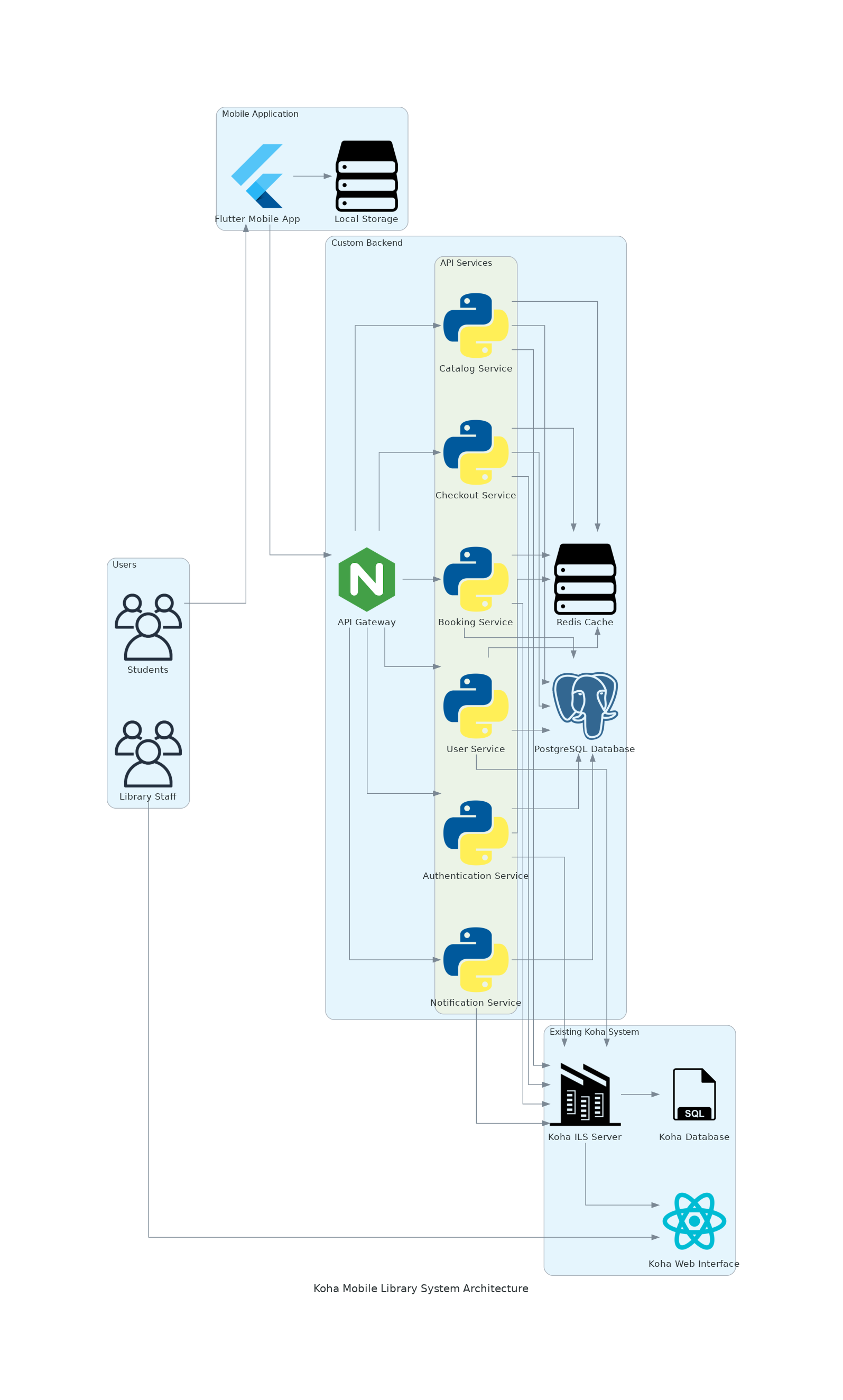
Components
Existing Koha System
- Koha ILS Server: The core Koha system that manages library operations
- Koha Database: The database storing all library data
- Koha Web Interface: The existing web interface used by library staff
Custom Backend
- API Gateway: Manages API requests, authentication, and routing
- Authentication Service: Handles user authentication and token management
- Catalog Service: Manages catalog search and book information
- Checkout Service: Handles checkout operations and renewals
- Booking Service: Manages resource booking and reservations
- User Service: Handles user profile and preferences
- Notification Service: Manages notifications and alerts
- Redis Cache: Provides caching for improved performance
- PostgreSQL Database: Stores application-specific data
Mobile Application
- Flutter Mobile App: Cross-platform mobile application for iOS and Android
- Local Storage: Provides offline data access and caching
Technology Stack
Backend Stack
- Programming Language: Python
- Web Framework: FastAPI
- Database: PostgreSQL
- Caching: Redis
- API Gateway: Nginx
- Authentication: JWT with OAuth2
- Containerization: Docker
Mobile Stack
- Framework: Flutter
- State Management: Provider
- Local Database: SQLite
- HTTP Client: Dio
- Authentication: flutter_secure_storage
Data Flow
- The Flutter mobile app sends requests to the custom backend API gateway
- The API gateway routes requests to appropriate microservices
- Microservices interact with the Koha ILS through its REST API
- Responses are processed, cached, and returned to the mobile app
- The mobile app stores relevant data for offline access
Koha API Integration
The Koha Mobile Library System integrates with the Koha ILS through its REST API. This section outlines the API capabilities and integration approach.
Authentication Mechanisms
Koha REST API supports the following authentication mechanisms:
- HTTP Basic Authentication - Standard username/password authentication
- OAuth2 (client credentials grant) - Token-based authentication
- Cookie-based Authentication - Session-based authentication
Both Basic authentication and OAuth2 flow need to be enabled by system preferences.
API Endpoints Structure
The Koha API supports two sets of endpoints:
- Endpoints targeted at library staff (administrative functions)
- Endpoints targeted at library users (under the
/publicpath)
Student-Relevant API Endpoints
Biblios (Catalog Search)
- getList biblios - Search and retrieve bibliographic records
- getGet biblio - Retrieve a specific bibliographic record
Checkouts (Borrowing History)
- getList checkouts for a biblio - List all checkouts for a specific bibliographic record
- getList checkouts for a patron - List all checkouts for a specific patron
Bookings
- getList bookings - List all bookings
- postAdd booking - Create a new booking
Holds
APIs for placing, managing, and canceling holds
Patron Information
APIs for retrieving and updating patron information
Renewals
APIs for renewing borrowed items
Integration Considerations
- Authentication Flow - Implement secure OAuth2 token-based authentication
- Offline Caching - Design for offline access to frequently used data
- Rate Limiting - Implement appropriate rate limiting to prevent API abuse
- Error Handling - Develop robust error handling for various API response scenarios
- Data Normalization - Normalize API responses for consistent mobile UI presentation
Backend Blueprint
The backend serves as a bridge between the Koha ILS and the Flutter mobile application. This section outlines the structure and components of the custom backend.
Project Structure
backend/
├── docker-compose.yml        # Docker configuration for local development
├── Dockerfile                # Docker image definition
├── requirements.txt          # Python dependencies
├── .env.example              # Example environment variables
├── app/
│   ├── main.py               # Application entry point
│   ├── config.py             # Configuration settings
│   ├── core/                 # Core functionality
│   ├── api/                  # API routes
│   ├── services/             # Business logic
│   ├── models/               # Data models
│   ├── schemas/              # Pydantic schemas for validation
│   ├── db/                   # Database
│   ├── koha/                 # Koha API integration
│   └── utils/                # Utility functions
└── tests/                    # Tests
API Endpoints
Authentication Endpoints
- POST /api/v1/auth/login - OAuth2 compatible token login
- POST /api/v1/auth/refresh - Refresh access token
- GET /api/v1/auth/me - Get current user information
Catalog Endpoints
- GET /api/v1/catalog/books - Search books in the catalog
- GET /api/v1/catalog/books/{book_id} - Get detailed information about a specific book
Checkout Endpoints
- GET /api/v1/checkouts - Get all checkouts for the current user
- POST /api/v1/checkouts - Create a new checkout
- POST /api/v1/checkouts/{checkout_id}/renew - Renew a checkout
Booking Endpoints
- GET /api/v1/bookings - Get all bookings for the current user
- POST /api/v1/bookings - Create a new booking
- DELETE /api/v1/bookings/{booking_id} - Delete a booking
User Endpoints
- GET /api/v1/users/profile - Get current user profile
- PUT /api/v1/users/profile - Update current user profile
Notification Endpoints
- GET /api/v1/notifications - Get all notifications for the current user
- PUT /api/v1/notifications/{notification_id} - Mark a notification as read
Service Layer
The service layer contains the business logic for interacting with the Koha API and managing application data.
Authentication Service
Handles user authentication, token generation, and validation.
Catalog Service
Manages catalog search and book information retrieval.
Checkout Service
Handles checkout operations, renewals, and checkout history.
Booking Service
Manages resource booking and reservations.
User Service
Handles user profile and preferences management.
Notification Service
Manages notifications and alerts for due dates, available holds, etc.
Data Models
The backend uses SQLAlchemy ORM for database operations with the following key models:
User Model
Stores user information and preferences.
Checkout Model
Tracks checkout information and status.
Koha API Integration
The backend includes a Koha API client for interacting with the Koha ILS.
Koha API Client
Provides methods for authenticating with Koha and making API requests.
Docker Configuration
The backend includes Docker configuration for development and deployment.
Dockerfile
Defines the container image for the backend application.
Docker Compose
Configures the development environment with PostgreSQL and Redis.
Mobile Application Design
The mobile application provides a user-friendly interface for students to access library resources and services. This section outlines the design and components of the Flutter mobile application.
App Structure
The mobile application follows a modern, intuitive navigation pattern with:
- Bottom navigation for primary sections
- Card-based UI for content display
- Pull-to-refresh for content updates
- Offline capabilities with appropriate indicators
- Material Design principles
Screen Designs
Login Screen
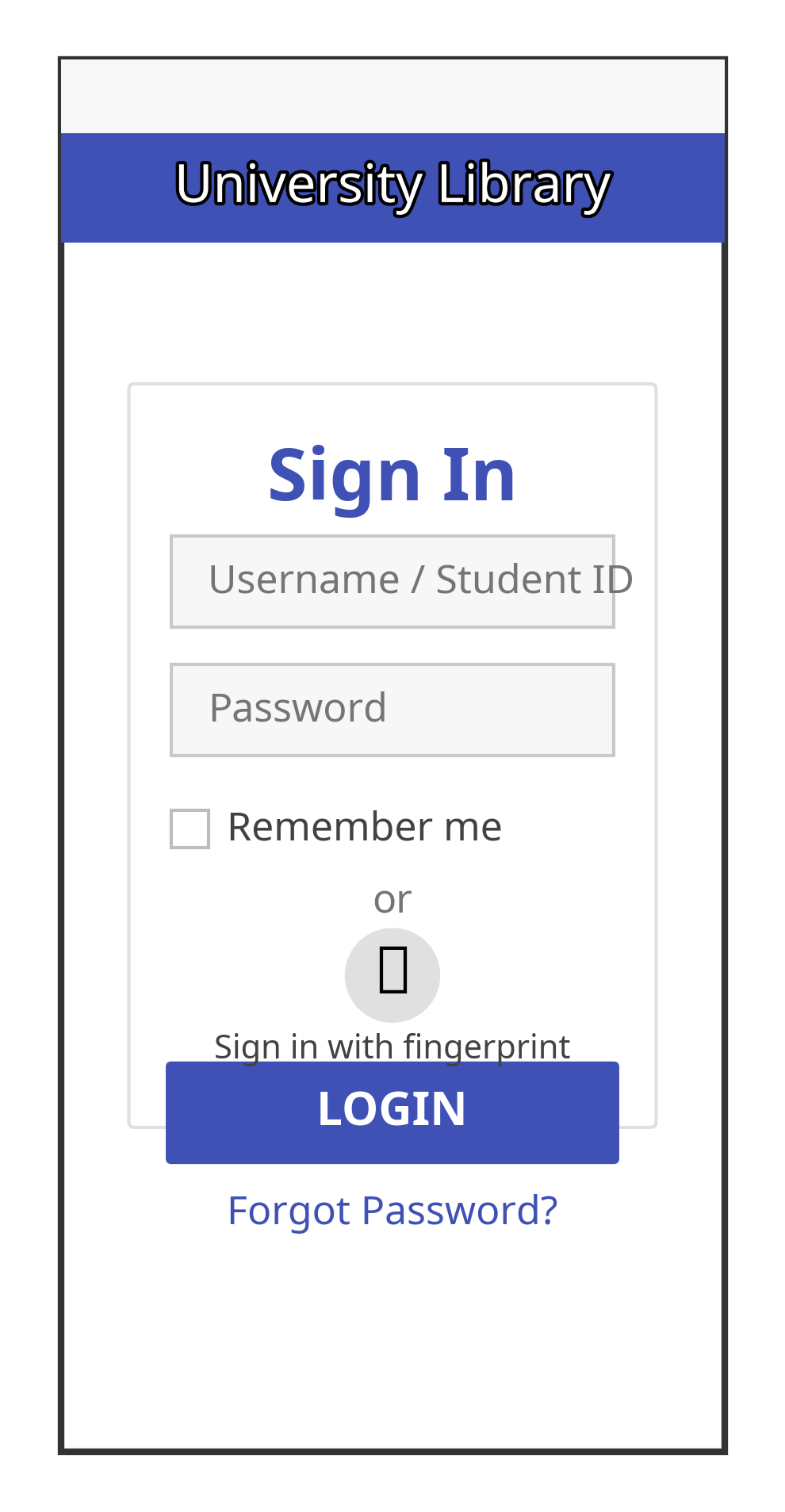
The login screen provides:
- University branding with library system logo
- Student credentials input
- Remember me option
- Biometric authentication option
- Forgot password link
Home Screen
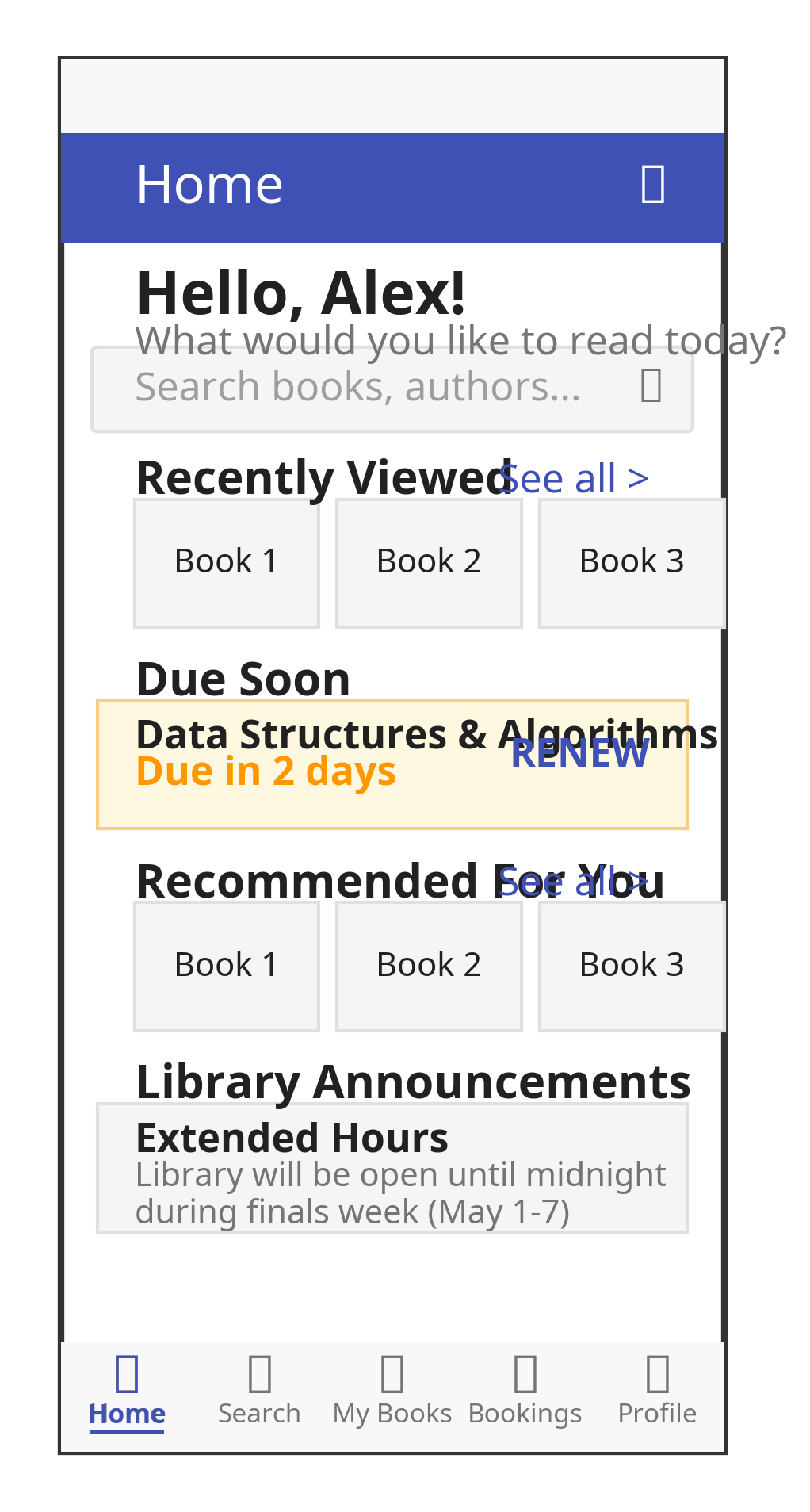
The home screen includes:
- User greeting and quick search bar
- Recently viewed books
- Due soon section for books due within 3 days
- Recommended books based on borrowing history
- Library announcements
- Quick actions (scan book, view QR code for student ID, renew all)
Search Screen
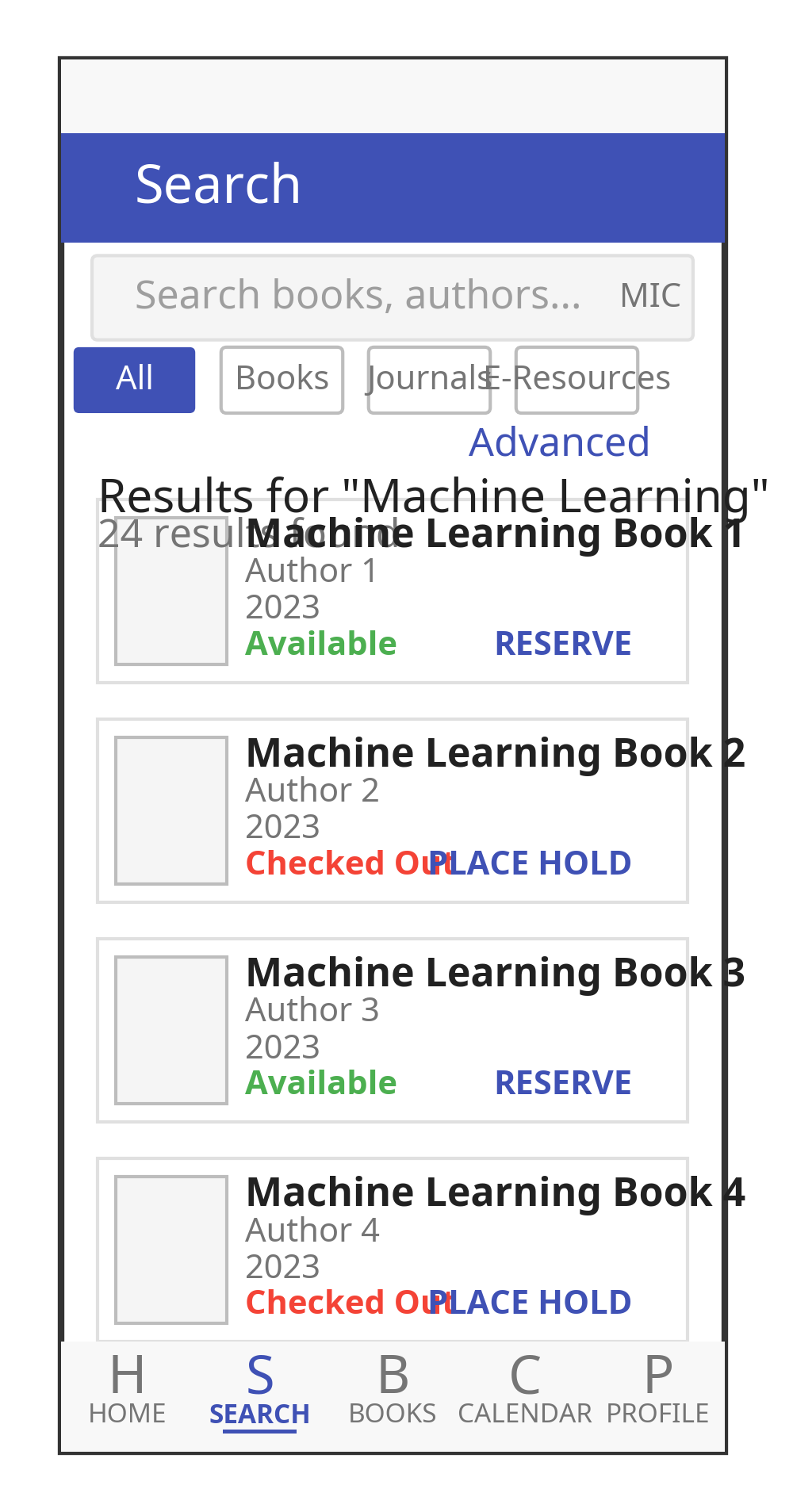
The search screen provides:
- Search bar with voice input option
- Advanced search filters
- Search results with book cover, title, author, and availability status
- Quick action buttons for reserving or viewing details
Book Details Screen
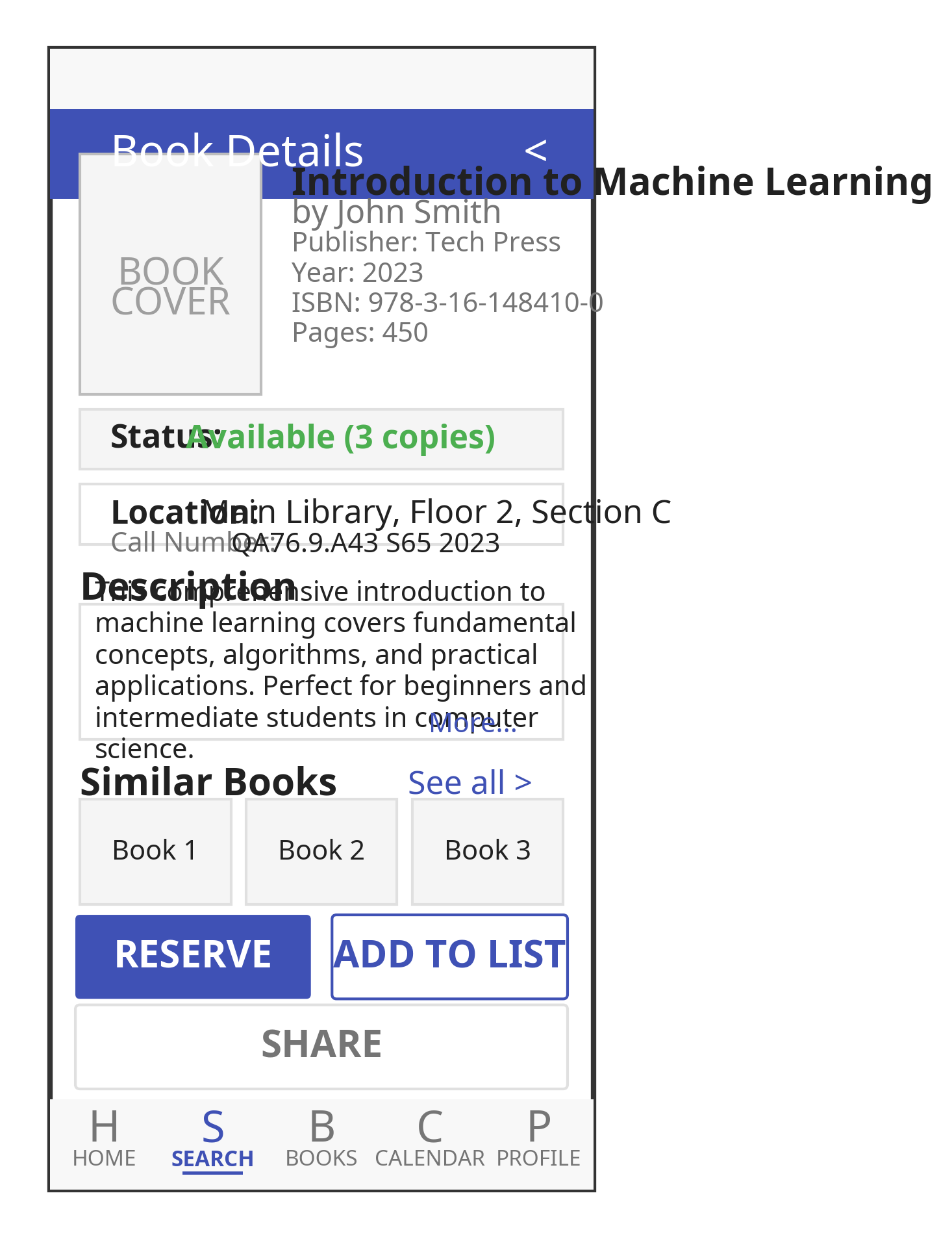
The book details screen includes:
- Book cover image
- Metadata (title, author, publisher, year, ISBN)
- Description
- Availability status with location information
- Similar books recommendations
- Action buttons (reserve, add to list, share)
User Flows
Book Search & Checkout Flow
- User enters search query on home screen or search tab
- User browses search results
- User selects a book to view details
- User checks availability
- If available, user requests checkout
- Confirmation screen shows successful checkout with due date
Renewal Flow
- User navigates to My Books > Currently Borrowed
- User selects book(s) to renew
- User taps "Renew" button
- System processes renewal request
- Confirmation screen shows new due dates or renewal restrictions
Reservation Flow
- User searches for a book that is currently unavailable
- User selects "Place Hold" on book details screen
- System confirms hold placement
- User receives notification when book becomes available
Design Considerations
Accessibility
- High contrast options
- Text scaling
- Screen reader compatibility
- Voice commands for key functions
Offline Functionality
- Cached catalog data for basic searches
- Stored user borrowing information
- Queue for operations when offline
- Clear sync status indicators
Security Integration Plan
Security is a critical aspect of the Koha Mobile Library System. This section outlines the comprehensive security measures implemented in the system.
Authentication
OAuth2 Implementation
The system implements the OAuth2 authorization framework for secure API access:
- Client Registration
- Register the mobile application with the custom backend
- Generate client ID and client secret
- Store client secret securely in the application
- Authorization Flow
+--------+                               +---------------+
|        |--(A)- Authorization Request ->|   Resource    |
|        |                               |     Owner     |
|        |<-(B)-- Authorization Grant ---|               |
|        |                               +---------------+
|        |
|        |                               +---------------+
|        |--(C)-- Authorization Grant -->| Authorization |
| Client |                               |     Server    |
|        |<-(D)----- Access Token -------|               |
|        |                               +---------------+
|        |
|        |                               +---------------+
|        |--(E)----- Access Token ------>|    Resource   |
|        |                               |     Server    |
|        |<-(F)--- Protected Resource ---|               |
+--------+                               +---------------+
- Token Management
- Secure storage of access tokens using platform-specific secure storage
- Automatic token refresh mechanism
- Token revocation on logout or security breach detection
Biometric Authentication
For enhanced security and user convenience, the mobile application supports biometric authentication:
- Implementation
- Integration with Flutter's local_auth package
- Support for fingerprint and face recognition on compatible devices
- Fallback to password authentication when biometrics are unavailable
Secure Communication
API Security
- HTTPS Implementation
- Mandatory HTTPS for all API communications
- TLS 1.2+ with strong cipher suites
- Certificate validation to prevent man-in-the-middle attacks
- API Gateway Security
- Rate limiting to prevent brute force and DoS attacks
- Request validation to prevent injection attacks
- IP-based throttling for suspicious activity
- Certificate Pinning
- Implementation of certificate pinning in the mobile application
- Validation of server certificates against known good certificates
- Protection against compromised certificate authorities
Data Protection
Mobile Device Storage
- Sensitive Data Storage
- Use of Flutter's flutter_secure_storage for sensitive data
- Encryption of locally cached data
- Secure handling of offline data
- Secure Preferences
- Encryption of shared preferences
- Protection of user settings and preferences
- Secure storage of non-sensitive configuration data
Backend Data Protection
- Database Security
- Encryption of sensitive data at rest
- Proper access controls for database access
- Regular security audits and vulnerability assessments
- Cache Security
- Encryption of cached data
- Proper TTL (Time-to-Live) settings for cached data
- Secure handling of cached authentication information
Security Testing
Authentication Testing
- Credential Validation
- Test valid and invalid credential combinations
- Verify proper error handling for invalid credentials
- Test account lockout after multiple failed attempts
- Token Management
- Verify token generation and validation
- Test token expiration and refresh mechanisms
- Verify token revocation on logout
Compliance Considerations
Data Protection Regulations
- GDPR Compliance
- User consent for data collection
- Data minimization principles
- Right to access and delete personal data
- Educational Data Privacy
- Compliance with educational data protection laws
- Protection of student records
- Proper handling of academic information
Optimization Strategy
Performance optimization is essential for providing a smooth user experience across various devices and network conditions. This section outlines the optimization strategies implemented in the Koha Mobile Library System.
Frontend Optimization Strategies
Code-Level Optimizations
- State Management - Efficient state management using Provider to minimize rebuilds and optimize memory usage
- Widget Optimization - Optimized list rendering with ListView.builder for smooth scrolling and efficient memory usage
- Memory Management - Image caching and memory management to reduce memory usage and improve performance
UI/UX Optimizations
- Lazy Loading and Pagination
- Implement lazy loading for images and content
- Use pagination for large data sets (books, borrowing history)
- Load data incrementally as the user scrolls
- Responsive Design
- Use responsive layouts that adapt to different screen sizes
- Implement adaptive UI components based on device capabilities
- Optimize touch targets for mobile interaction (minimum 48x48 dp)
Offline Capabilities
- Offline-First Architecture - Implementation of an offline-first architecture that prioritizes local data access and synchronizes with the server when online
- Synchronization Strategy - Robust synchronization mechanism for handling offline changes and resolving conflicts
Backend Optimization Strategies
API Optimization
- Response Compression - Implementation of GZip compression middleware to reduce response size and improve transfer speed
- Response Optimization - Field filtering and pagination to minimize payload size and optimize response time
Caching Strategy
- Redis Caching Implementation - Multi-level caching strategy using Redis for improved performance and reduced load on the Koha API
- Tiered Caching Strategy
- Browser caching with appropriate cache headers
- Redis for server-side caching of frequently accessed data
- In-memory caching for ultra-fast access to critical data
Network Optimization Strategies
Bandwidth Optimization
- Request Batching - Batching of related requests to reduce the number of API calls and improve performance
- Data Compression
- Use gzip compression for API responses
- Implement image compression for book covers
- Use efficient data formats (JSON vs. XML)
Connection Management
- Connection Pooling - Implementation of connection pooling to reduce connection overhead and improve performance
- Retry Strategy - Robust retry strategy with exponential backoff for handling network failures and improving reliability
Testing and Monitoring
Performance Testing
- Load Testing
- Simulate concurrent users accessing the system
- Measure response times under various load conditions
- Identify bottlenecks and optimize accordingly
- Device Testing
- Test on a range of devices (low-end to high-end)
- Measure startup time, memory usage, and frame rates
- Optimize for the lowest common denominator
Implementation Timeline
The implementation of the Koha Mobile Library System follows a structured timeline to ensure systematic progress and timely completion. This section outlines the implementation phases, milestones, and deliverables.
Project Duration
- Total Duration: 16 weeks
- Start Date: May 1, 2025
- Completion Date: August 20, 2025
Phase 1: Project Setup and Foundation (Weeks 1-2)
Week 1: Project Initialization (May 1 - May 7)
- Project kickoff meeting and team onboarding
- Development environment setup
- Backend project structure setup
Week 2: Core Infrastructure (May 8 - May 14)
- Database schema implementation
- Authentication framework implementation
- Flutter project initialization
Phase 2: Backend Development (Weeks 3-6)
Week 3: Koha API Integration (May 15 - May 21)
- Koha authentication integration
- Catalog service implementation
Week 4: Checkout and Booking Services (May 22 - May 28)
- Checkout service implementation
- Booking service implementation
Week 5: User and Notification Services (May 29 - June 4)
- User service implementation
- Notification service implementation
Week 6: API Optimization and Testing (June 5 - June 11)
- API response optimization
- Backend performance optimization
- Backend testing
Phase 3: Frontend Development (Weeks 7-11)
Week 7: Authentication and Home Screen (June 12 - June 18)
- Authentication screens implementation
- Home screen implementation
Week 8: Search and Catalog Screens (June 19 - June 25)
- Search functionality implementation
- Book details screen implementation
Week 9: My Books and Checkout Management (June 26 - July 2)
- My books screen implementation
- Checkout management implementation
Week 10: Bookings and Notifications (July 3 - July 9)
- Booking screens implementation
- Notification center implementation
Week 11: Profile and Settings (July 10 - July 16)
- Profile screen implementation
- Settings screen implementation
Phase 4: Offline Capabilities and Optimization (Weeks 12-14)
Week 12: Offline Data Management (July 17 - July 23)
- Local database implementation
- Offline mode implementation
Week 13: Frontend Optimization (July 24 - July 30)
- UI performance optimization
- State management optimization
Week 14: Network and Battery Optimization (July 31 - August 6)
- Network optimization
- Battery usage optimization
Phase 5: Testing, Deployment, and Documentation (Weeks 15-16)
Week 15: Testing and Quality Assurance (August 7 - August 13)
- Unit and integration testing
- User acceptance testing
- Performance testing
Week 16: Deployment and Documentation (August 14 - August 20)
- Deployment preparation
- Documentation completion
- Project handover
Milestones and Deliverables
Milestone 1: Project Foundation (End of Week 2)
- Completed project setup
- Functional development environments
- Basic infrastructure in place
- Database schema implemented
Milestone 2: Backend API Completion (End of Week 6)
- Koha API integration completed
- All backend services implemented
- API documentation generated
- Backend tests passing
Milestone 3: Core Mobile App Functionality (End of Week 11)
- Authentication and user management implemented
- Catalog search and browsing functional
- Checkout and booking management completed
- Profile and settings screens implemented
Milestone 4: Enhanced Features and Optimization (End of Week 14)
- Offline capabilities implemented
- Performance optimizations completed
- Battery and network usage optimized
- All features fully functional
Milestone 5: Project Completion (End of Week 16)
- All testing completed
- Application deployed
- Documentation delivered
- Project handed over to stakeholders
Conclusion
The Koha Mobile Library System provides a comprehensive solution for extending the existing Koha ILS with a modern, student-centric mobile application. By following the architecture, design, and implementation strategies outlined in this documentation, the development team can create a high-quality, secure, and efficient mobile library system that meets the needs of university students while maintaining compatibility with the existing Koha infrastructure.
Key benefits of the solution include:
- Enhanced User Experience: The intuitive mobile interface provides students with easy access to library resources and services.
- Seamless Integration: The custom backend ensures smooth integration with the existing Koha ILS without disrupting library operations.
- Robust Security: Comprehensive security measures protect user data and ensure secure authentication and communication.
- Efficient Performance: Optimization strategies ensure smooth operation across various devices and network conditions.
- Offline Capabilities: Students can access essential information and queue operations even when offline.
- Scalable Architecture: The modular, microservices-based architecture allows for easy scaling and maintenance.
The implementation timeline provides a structured approach to developing the system over a 16-week period, with clear milestones and deliverables to ensure systematic progress and timely completion.
By implementing this solution, the university library can provide modern, mobile access to its resources and services, enhancing the student experience and increasing engagement with library offerings.